How the Application Simplifies Task Downtime and Constraint Reporting?
Why We Designed and Developed the Task Reporting App to Address Construction Challenges?
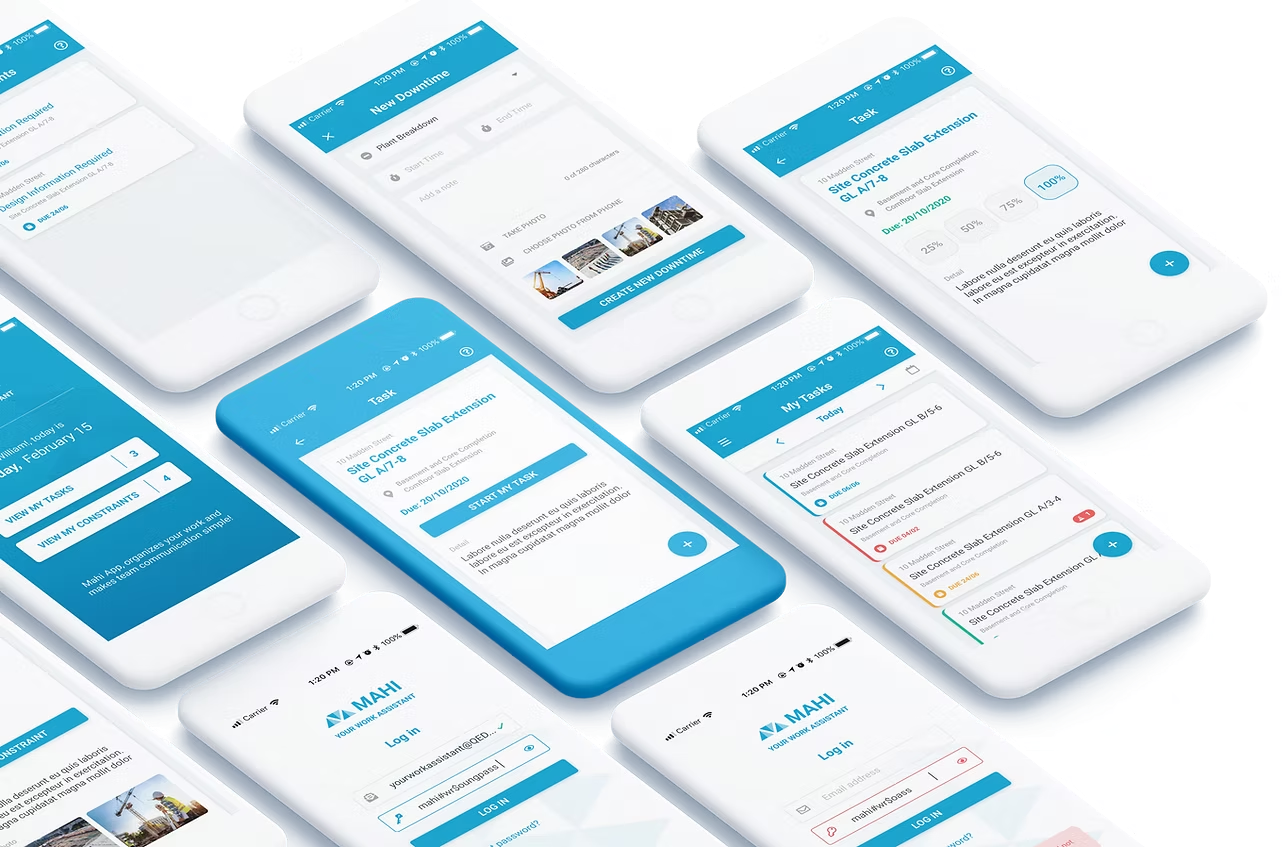
Construction reporting was plagued by delays, miscommunication, and inefficient tools, leaving contractors frustrated and project managers without real-time visibility. To tackle this, I redesigned the reporting process, creating a native app that simplifies task logging and integrates live data into the Gantt chart module.
Contractors can now report progress and constraints effortlessly, giving project managers instant updates to improve coordination and decision-making.
Who Are the End Users of Our Task Reporting App and the ChallengesThey Face?
80% of user reported various frustrations during evaluations.
Team Leads or Supervisors - Real-time updates and task views to keep teams aligned.
Contractor or Subcontractor - Access task timelines and log work status to align with plans.
40-60% of contractor reports
focus on constraints such as
material shortages, equipment
failures, and environmental
conditions.
Navigating schedules across
weeks was cumbersome,
requiring extensive scrolling.
Constraint reporting dominates
on-site reports due to the
dynamic nature of construction
and frequent unexpected
challenges.
Participants struggled to log
constraints quickly due to
difficulty locating the log button.
Users with larger fingers faced
difficulty tapping small buttons
in the application.
Users with older phones faced
functionality issues as the app
did not perform optimally on
their devices.
Reporting constraints directly to
project managers during shifts
was challenging, disrupting
workflow and performance.
20% of our participants were
color-blind.
How We Enhanced Usability by Reducing Friction Through User Flow
Iterations?
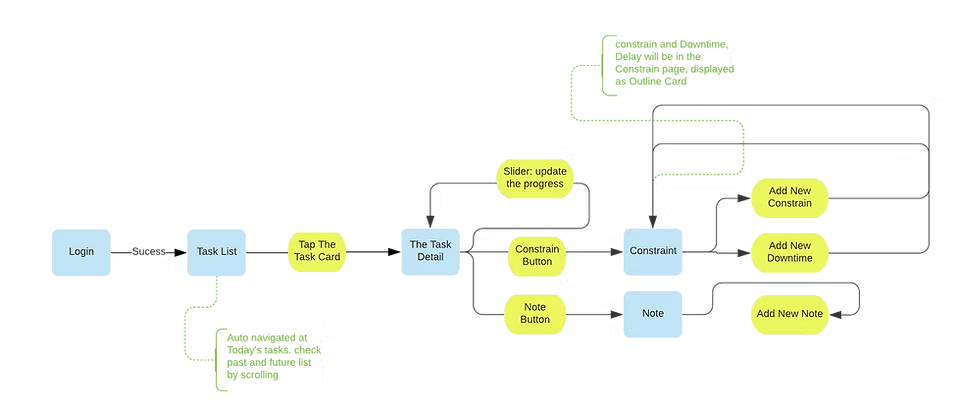
Field studies revealed that 40-60% of reports from contractors and subcontractors involve constraint reporting, emphasizing its importance in construction site management.
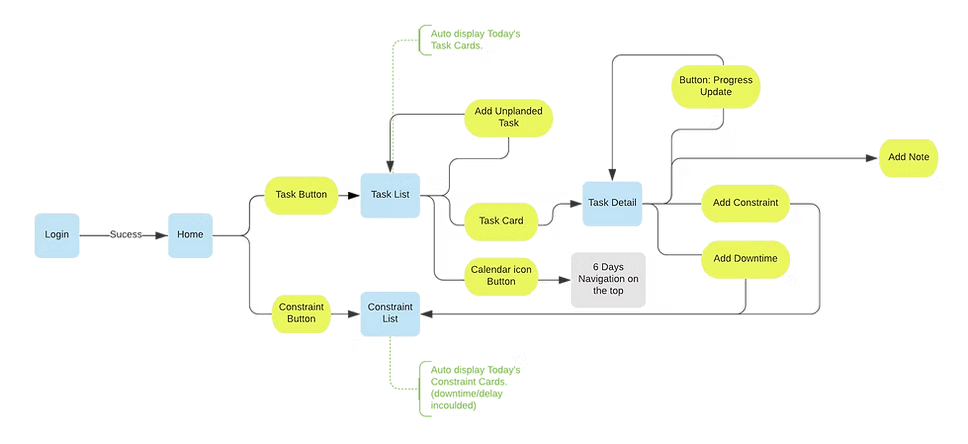
To address this, we developed a streamlined user flow chart, focusing on simplifying task logging and ensuring seamless constraint reporting processes.
Existing Version
Goal Iteration
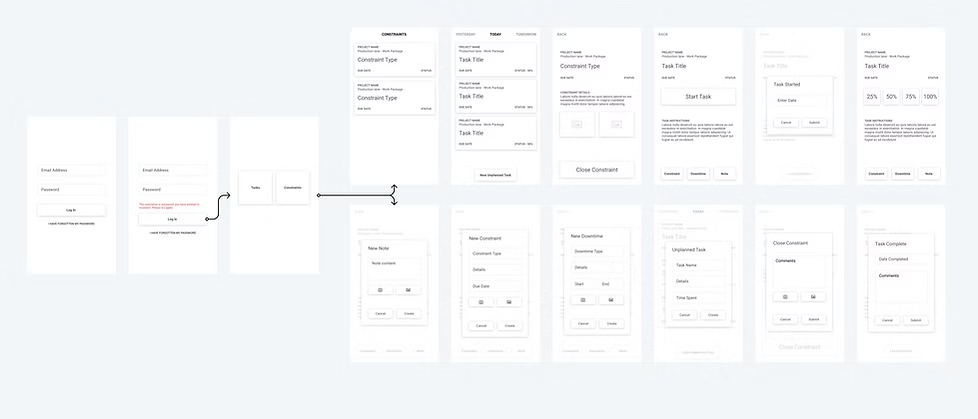
How Wireframes Resolved Key Usability Challenges in the Progress Reporting App for Contractors
The wireframe phase tackled usability challenges, including progress updates, task navigation, and constraint logging, critical actions for construction management hindered by unclear interfaces and cumbersome workflows.
How Did Iterative Design Turn User Challenges into Usability Improvements?
Before
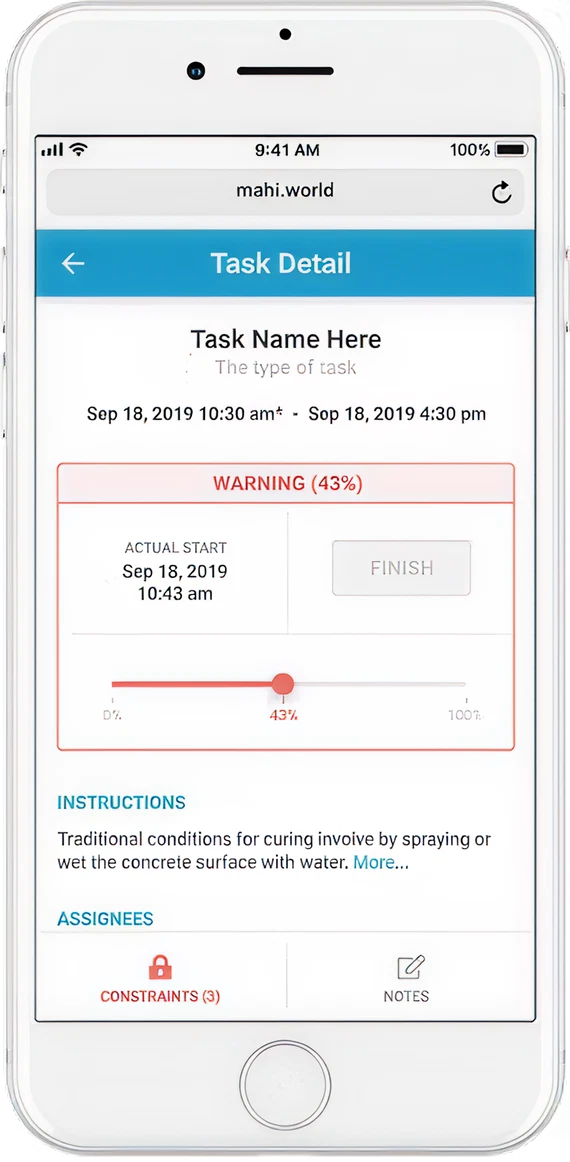
Progress updates were complicated, requiring navigation of small, cumbersome slider buttons.
After
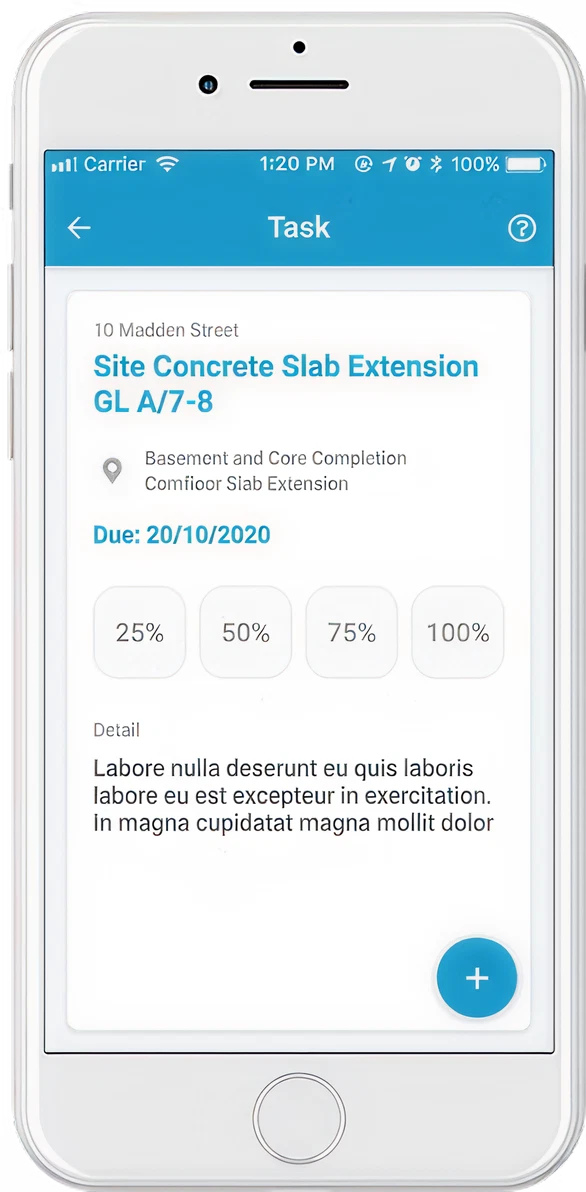
Progress updating is streamlined with large buttons for four status options and essential four-digit clarity, ensuring consistency and ease.
Before
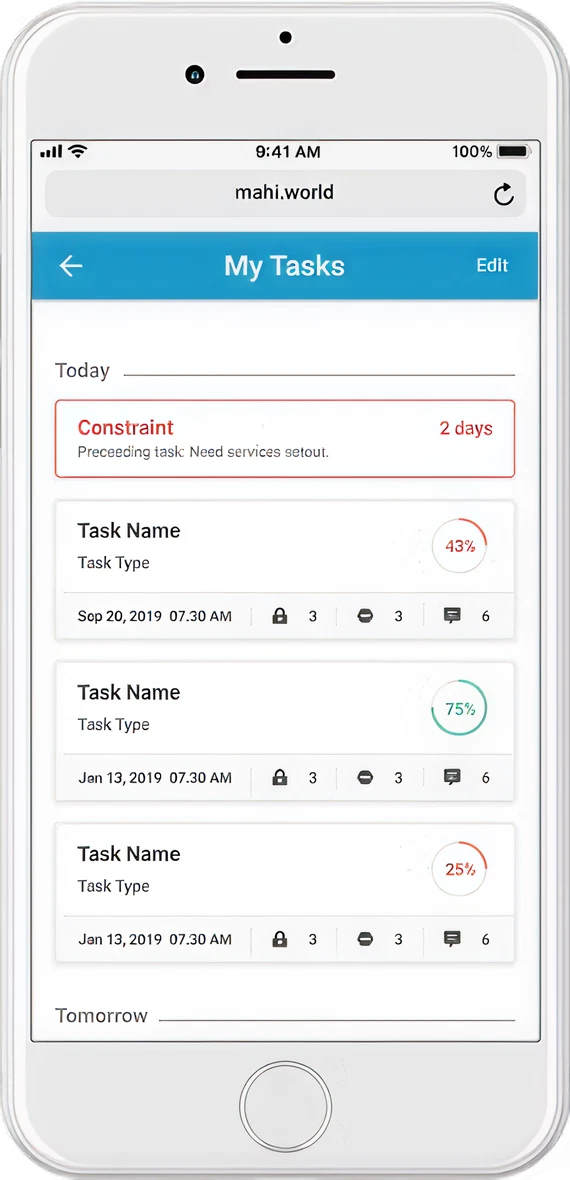
Task cards made quick date review difficult, requiring excessive scrolling between days.
After
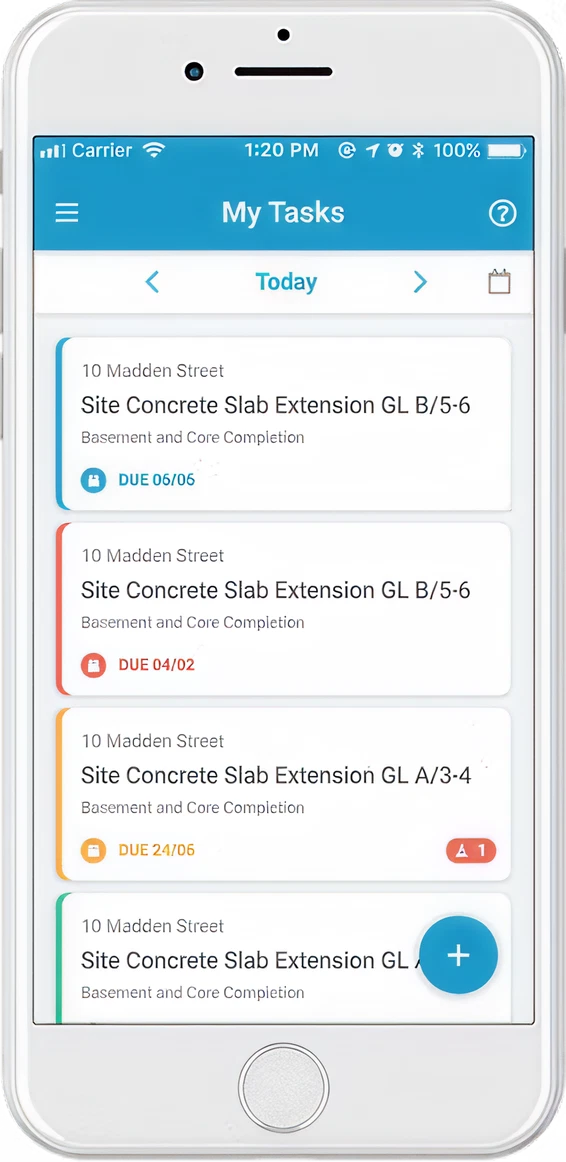
A small calendar at the top displays today’s tasks by default, with easy navigation for other dates via left/right clicks or a calendar icon.
Before
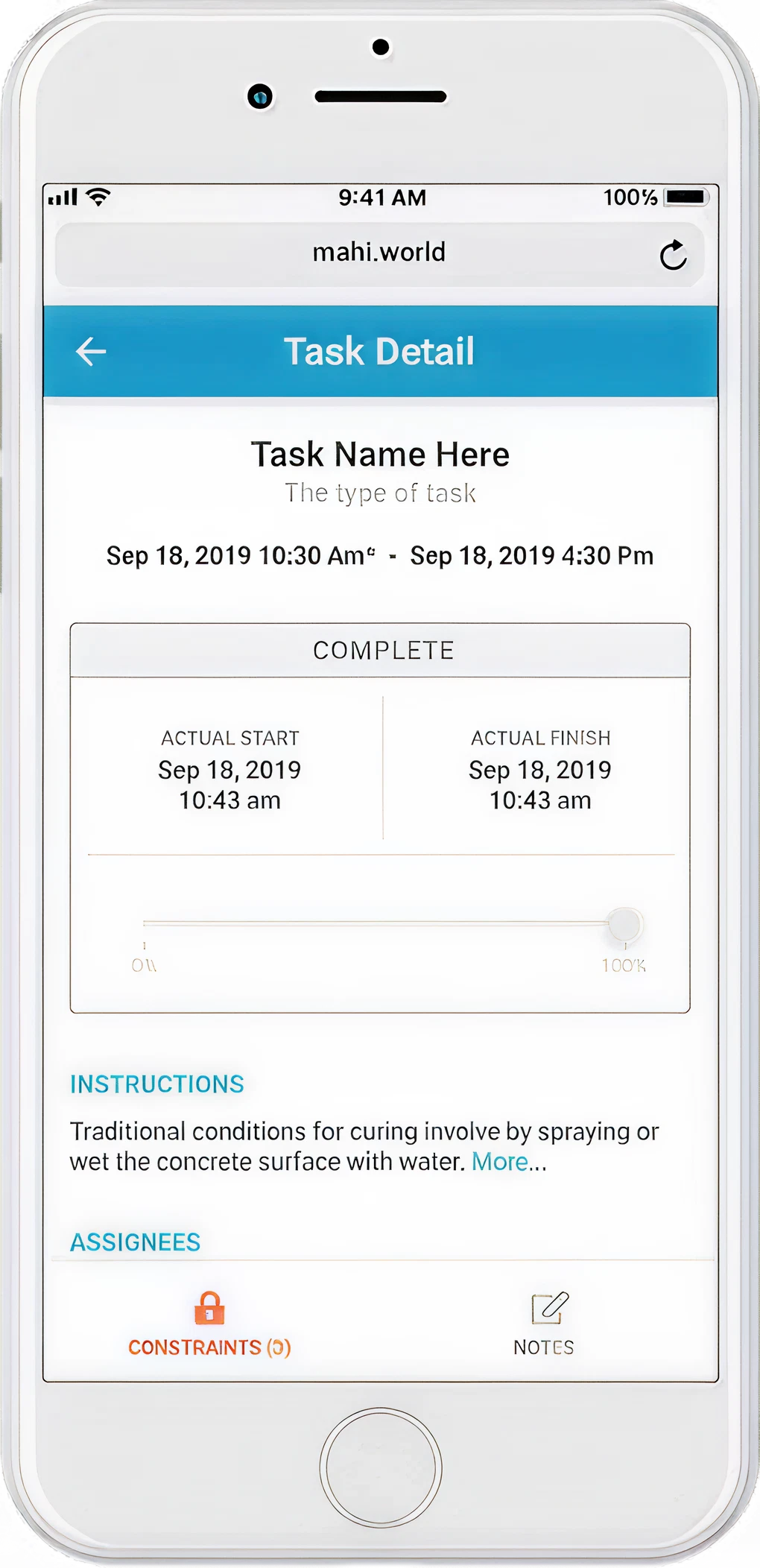
Logging constraints was difficult, slowing down a critical process that directly impacted progress.
After
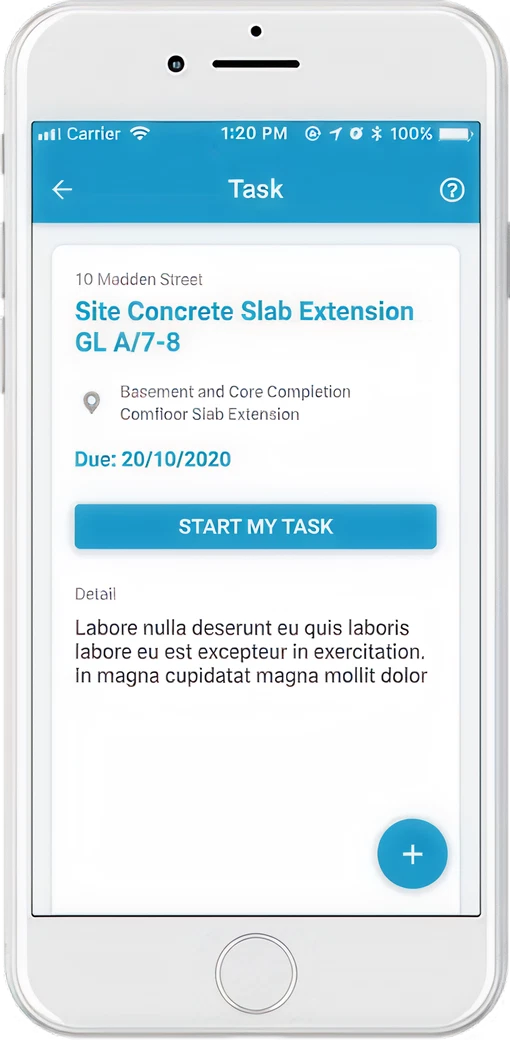
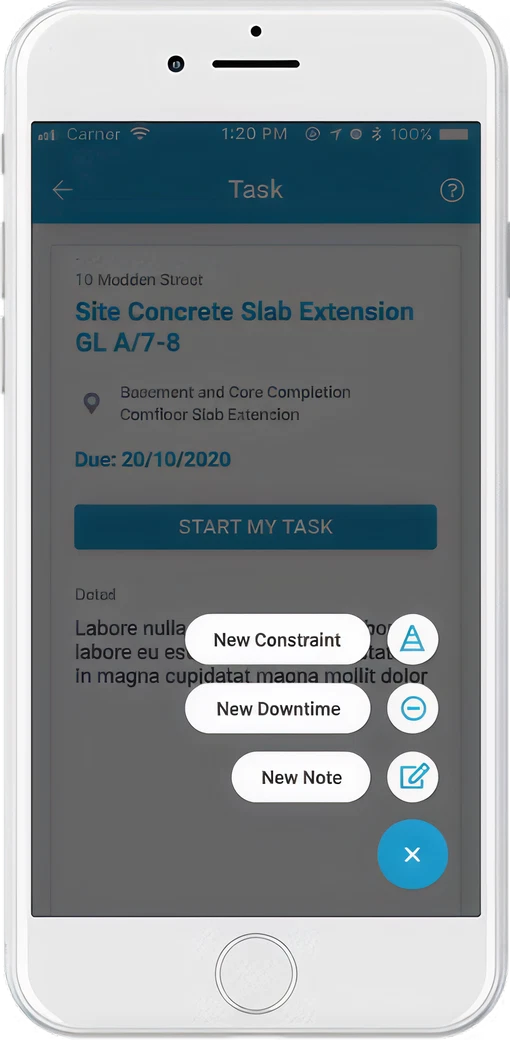
The task detail section now features a clear CTA button and prioritizes task due dates for contractors. Start and finish dates are sent directly to the dashboard for planners, ensuring accurate and transparent data without overwhelming contractors.
Inclusive Design for Our Target
Audience:
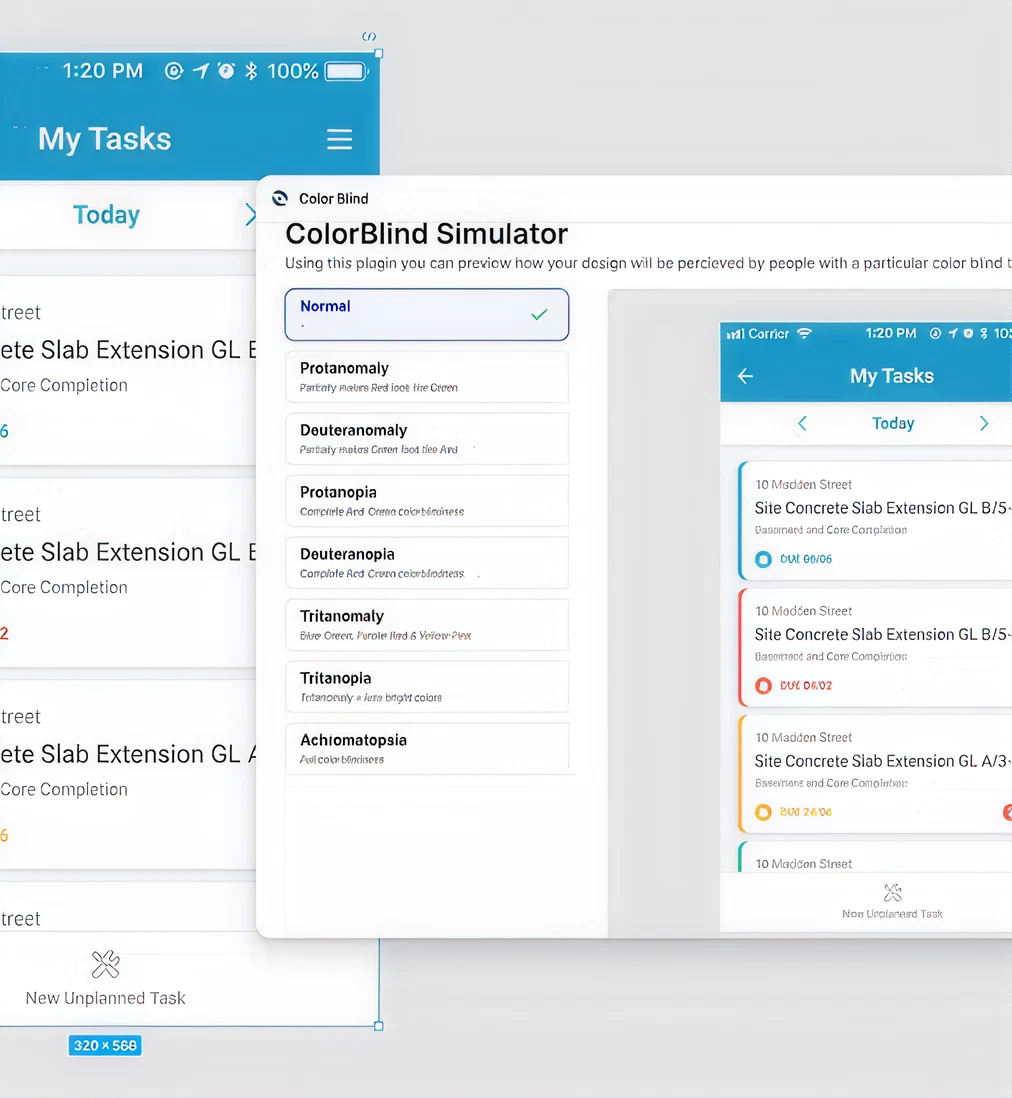
We have studied our end users for the mobile app, focusing on construction workers with color blindness. To ensure inclusivity, we have utilized plugins to double - check the color schemes in our design and verify that they meet accessibility standards.
Ensuring Text Legibility: An Accessibility Focus
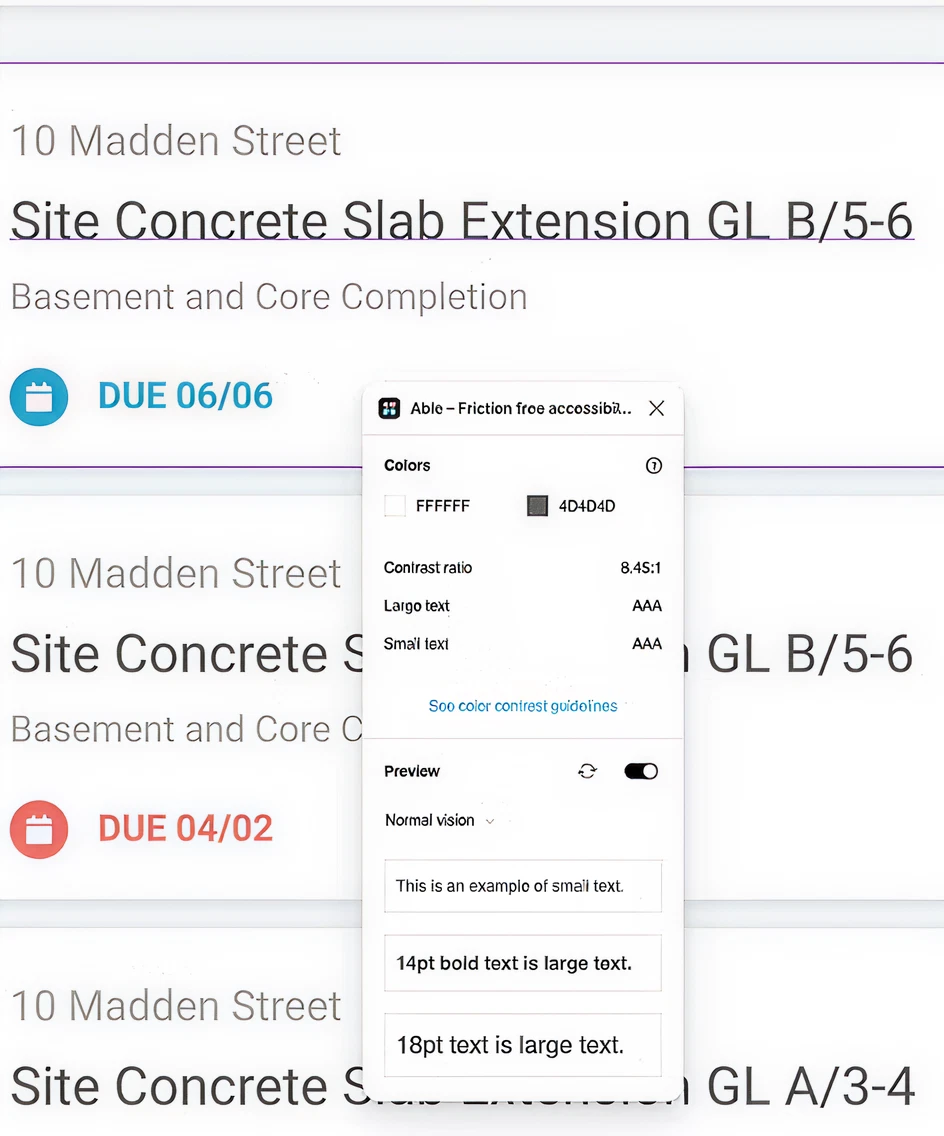
Readability Check Based on Web Content Accessibility Guidelines (WCAG)
We ensured our design complies with WCAG AAA standards by maintaining a high contrast ratio for optimal readability of both large and small text. Clear typography and distinct visual elements further enhance accessibility for all users.
Outcome
By surfacing the most important actions, such as logging constraints, updating task progress, and accessing key project info users could now complete daily reporting faster and with fewer errors.
Collaboration between on-site teams and management also improved, with real-time data syncing into the central system.
Feedback from the field confirmed that the updated app reduced confusion, increased usage, and empowered contractors to focus more on the job, not the software.
It was a reminder that when design meets real-world constraints, the result is not just usability—it’s clarity in chaos.


How the Application Simplifies Task Downtime and Constraint Reporting?
Why We Designed and Developed the Task Reporting App to Address
Construction Challenges?
Construction reporting was plagued by delays, miscommunication, and inefficient tools, leaving contractors frustrated and project managers without real-time visibility. To tackle this, I redesigned the reporting process, creating a native app that simplifies task logging and integrates live data into the Gantt chart module.
Contractors can now report progress and constraints effortlessly, giving project managers instant updates to improve coordination and decision-making.
Who Are the End Users of Our Task Reporting App and the Challenges They
Face?
80% of user reported various frustrations during evaluations.
Team Leads or Supervisors - Real-time updates and task views to keep teams aligned.
Contractor or Subcontractor - Access task timelines and log work status to align with plans.
40-60% of contractor reports
focus on constraints such as
material shortages, equipment
failures, and environmental
conditions.
Navigating schedules across
weeks was cumbersome,
requiring extensive scrolling.
Constraint reporting dominates
on-site reports due to the
dynamic nature of construction
and frequent unexpected
challenges.
Participants struggled to log
constraints quickly due to
difficulty locating the log button.
Users with larger fingers faced
difficulty tapping small buttons
in the application.
Users with older phones faced
functionality issues as the app
did not perform optimally on
their devices.
Reporting constraints directly to
project managers during shifts
was challenging, disrupting
workflow and performance.
20% of our participants were
color-blind.
How We Enhanced Usability by Reducing Friction Through User Flow
Iterations?
Field studies revealed that 40-60% of reports from contractors and subcontractors involve constraint reporting, emphasizing its importance in construction site management.
To address this, we developed a streamlined user flow chart, focusing on simplifying task logging and ensuring seamless constraint reporting processes.
Existing Version
Goal Iteration
How Wireframes Resolved Key Usability Challenges in the Progress
Reporting App for Contractors
The wireframe phase tackled usability challenges, including progress updates, task navigation, and constraint logging, critical actions for construction management hindered by unclear interfaces and cumbersome workflows.
How Did Iterative Design Turn User Challenges into Usability Improvements?
Before
Progress updates were complicated, requiring navigation of small, cumbersome slider buttons.
After
Progress updating is streamlined with large buttons for four status options and essential four-digit clarity, ensuring consistency and ease.
Before
Task cards made quick date review difficult, requiring excessive scrolling between days.
After
A small calendar at the top displays today’s tasks by default, with easy navigation for other dates via left/right clicks or a calendar icon.
Before
Logging constraints was difficult, slowing down a critical process that directly impacted progress.
After
The task detail section now features a clear CTA button and prioritizes task due dates for contractors. Start and finish dates are sent directly to the dashboard for planners, ensuring accurate and transparent data without overwhelming contractors.
Inclusive Design for Our Target
Audience:
We have studied our end users for the mobile app, focusing on construction workers with color blindness. To ensure inclusivity, we have utilized plugins to double - check the color schemes in our design and verify that they meet accessibility standards.
Ensuring Text Legibility: An Accessibility Focus
Readability Check Based on Web Content Accessibility Guidelines (WCAG)
We ensured our design complies with WCAG AAA standards by maintaining a high contrast ratio for optimal readability of both large and small text. Clear typography and distinct visual elements further enhance accessibility for all users.
Outcome
By surfacing the most important actions, such as logging constraints, updating task progress, and accessing key project info users could now complete daily reporting faster and with fewer errors.
Collaboration between on-site teams and management also improved, with real-time data syncing into the central system.
Feedback from the field confirmed that the updated app reduced confusion, increased usage, and empowered contractors to focus more on the job, not the software.
It was a reminder that when design meets real-world constraints, the result is not just usability—it’s clarity in chaos.
How the Application Simplifies Task Downtime and Constraint Reporting?
Why We Designed and Developed the Task Reporting App to Address
Construction Challenges?
Construction reporting was plagued by delays, miscommunication, and inefficient tools, leaving contractors frustrated and project managers without real-time visibility. To tackle this, I redesigned the reporting process, creating a native app that simplifies task logging and integrates live data into the Gantt chart module.
Contractors can now report progress and constraints effortlessly, giving project managers instant updates to improve coordination and decision-making.
Who Are the End Users of Our Task Reporting App and the Challenges They
Face?
80% of user reported various frustrations during evaluations.
Team Leads or Supervisors - Real-time updates and task views to keep teams aligned.
Contractor or Subcontractor - Access task timelines and log work status to align with plans.
40-60% of contractor reports
focus on constraints such as
material shortages, equipment
failures, and environmental
conditions.
Constraint reporting dominates
on-site reports due to the
dynamic nature of construction
and frequent unexpected
challenges.
Navigating schedules across
weeks was cumbersome,
requiring extensive scrolling.
Participants struggled to log
constraints quickly due to
difficulty locating the log button.
Users with older phones faced
functionality issues as the app
did not perform optimally on
their devices.
Users with larger fingers faced
difficulty tapping small buttons
in the application.
Reporting constraints directly to
project managers during shifts
was challenging, disrupting
workflow and performance.
20% of our participants were
color-blind.
How We Enhanced Usability by Reducing Friction Through User Flow
Iterations?
Field studies revealed that 40-60% of reports from contractors and subcontractors involve constraint reporting, emphasizing its importance in construction site management.
To address this, we developed a streamlined user flow chart, focusing on simplifying task logging and ensuring seamless constraint reporting processes.
Existing Version
Goal Iteration
How Wireframes Resolved Key Usability Challenges in the Progress
Reporting App for Contractors
The wireframe phase tackled usability challenges, including progress updates, task navigation, and constraint logging, critical actions for construction management hindered by unclear interfaces and cumbersome workflows.
How Did Iterative Design Turn User Challenges into Usability Improvements?
Before
Progress updates were complicated,
requiring navigation of small,
cumbersome slider buttons.
After
Progress updating is streamlined with
large buttons for four status options and
essential four-digit clarity, ensuring
consistency and ease.
Before
Task cards made quick date review
difficult, requiring excessive scrolling
between days.
After
A small calendar at the top displays
today’s tasks by default, with easy
navigation for other dates via left/right
clicks or a calendar icon.
Before
Logging constraints was
difficult, slowing down a
critical process that
directly impacted
progress.
After
The task detail section now features a clear CTA button
and prioritizes task due dates for contractors. Start and
finish dates are sent directly to the dashboard for
planners, ensuring accurate and transparent data
without overwhelming contractors.
Inclusive Design for Our Target
Audience:
We have studied our end users for the mobile app, focusing on construction workers with color blindness. To ensure inclusivity, we have utilized plugins to double - check the color schemes in our design and verify that they meet accessibility standards.
Ensuring Text Legibility: An Accessibility Focus
Readability Check Based on Web Content Accessibility Guidelines (WCAG)
We ensured our design complies with WCAG AAA standards by maintaining a high contrast ratio for optimal readability of both large and small text. Clear typography and distinct visual elements further enhance accessibility for all users.
Outcome
By surfacing the most important actions, such as logging constraints, updating task progress, and accessing key project info users could now complete daily reporting faster and with fewer errors.
Collaboration between on-site teams and management also improved, with real-time data syncing into the central system.
Feedback from the field confirmed that the updated app reduced confusion, increased usage, and empowered contractors to focus more on the job, not the software.
It was a reminder that when design meets real-world constraints, the result is not just usability—it’s clarity in chaos.

Product Design
Playground
Hi I’m Karen
How the Application Simplifies Task Downtime and Constraint Reporting?
Why We Designed and Developed the Task Reporting App to Address
Construction Challenges?
Construction reporting was plagued by delays, miscommunication, and inefficient tools, leaving contractors frustrated and project managers without real-time visibility. To tackle this, I redesigned the reporting process, creating a native app that simplifies task logging and integrates live data into the Gantt chart module.
Contractors can now report progress and constraints effortlessly, giving project managers instant updates to improve coordination and decision-making.
Who Are the End Users of Our Task Reporting App and the Challenges They
Face?
80% of user reported various frustrations during evaluations.
Team Leads or Supervisors - Real-time updates and task views to keep teams aligned.
Contractor or Subcontractor - Access task timelines and log work status to align with plans.
40-60% of contractor reports
focus on constraints such as
material shortages, equipment
failures, and environmental
conditions.
Constraint reporting dominates
on-site reports due to the
dynamic nature of construction
and frequent unexpected
challenges.
Navigating schedules across
weeks was cumbersome,
requiring extensive scrolling.
Participants struggled to log
constraints quickly due to
difficulty locating the log button.
Users with older phones faced
functionality issues as the app
did not perform optimally on
their devices.
Users with larger fingers faced
difficulty tapping small buttons
in the application.
Reporting constraints directly to
project managers during shifts
was challenging, disrupting
workflow and performance.
20% of our participants were
color-blind.
How We Enhanced Usability by Reducing Friction Through User Flow
Iterations?
Field studies revealed that 40-60% of reports from contractors and subcontractors involve constraint reporting, emphasizing its importance in construction site management.
To address this, we developed a streamlined user flow chart, focusing on simplifying task logging and ensuring seamless constraint reporting processes.
Existing Version
Goal Iteration
How Wireframes Resolved Key Usability Challenges in the Progress
Reporting App for Contractors
The wireframe phase tackled usability challenges, including progress updates, task navigation, and constraint logging, critical actions for construction management hindered by unclear interfaces and cumbersome workflows.
How Did Iterative Design Turn User Challenges into Usability Improvements?
Before
Progress updates were complicated,
requiring navigation of small,
cumbersome slider buttons.
After
Progress updating is streamlined with
large buttons for four status options and
essential four-digit clarity, ensuring
consistency and ease.
Before
Task cards made quick date review
difficult, requiring excessive scrolling
between days.
After
A small calendar at the top displays
today’s tasks by default, with easy
navigation for other dates via left/right
clicks or a calendar icon.
Before
Logging constraints was
difficult, slowing down a
critical process that
directly impacted
progress.
After
The task detail section now features a clear CTA button
and prioritizes task due dates for contractors. Start and
finish dates are sent directly to the dashboard for
planners, ensuring accurate and transparent data
without overwhelming contractors.
Inclusive Design for Our Target
Audience:
We have studied our end users for the mobile app, focusing on construction workers with color blindness. To ensure inclusivity, we have utilized plugins to double - check the color schemes in our design and verify that they meet accessibility standards.
Ensuring Text Legibility: An Accessibility Focus
Readability Check Based on Web Content Accessibility Guidelines (WCAG)
We ensured our design complies with WCAG AAA standards by maintaining a high contrast ratio for optimal readability of both large and small text. Clear typography and distinct visual elements further enhance accessibility for all users.
Outcome
By surfacing the most important actions, such as logging constraints, updating task progress, and accessing key project info users could now complete daily reporting faster and with fewer errors.
Collaboration between on-site teams and management also improved, with real-time data syncing into the central system.
Feedback from the field confirmed that the updated app reduced confusion, increased usage, and empowered contractors to focus more on the job, not the software.
It was a reminder that when design meets real-world constraints, the result is not just usability—it’s clarity in chaos.
My Work
Playground
Hi I’m Karen